"TCS statement operators appear in Table 14" flagged an operator - why?
-
The portal's TCS statement lists every marketplace that deducted TCS from you. This check confirms each of them also appears in your Table 14 (e-commerce supplies) - the portal expects the two to line up.
-
The finding names the exact fix - e.g. "Amazon - replace 27AAICA3918J1CT with 08AAICA3918J1CT" or "Meesho - add a Table 14 row with 24AARCM9332R1CU". Marketplace GSTINs are state-wise, so this usually means your files carried the operator's OTHER state GSTIN than the one on the statement.
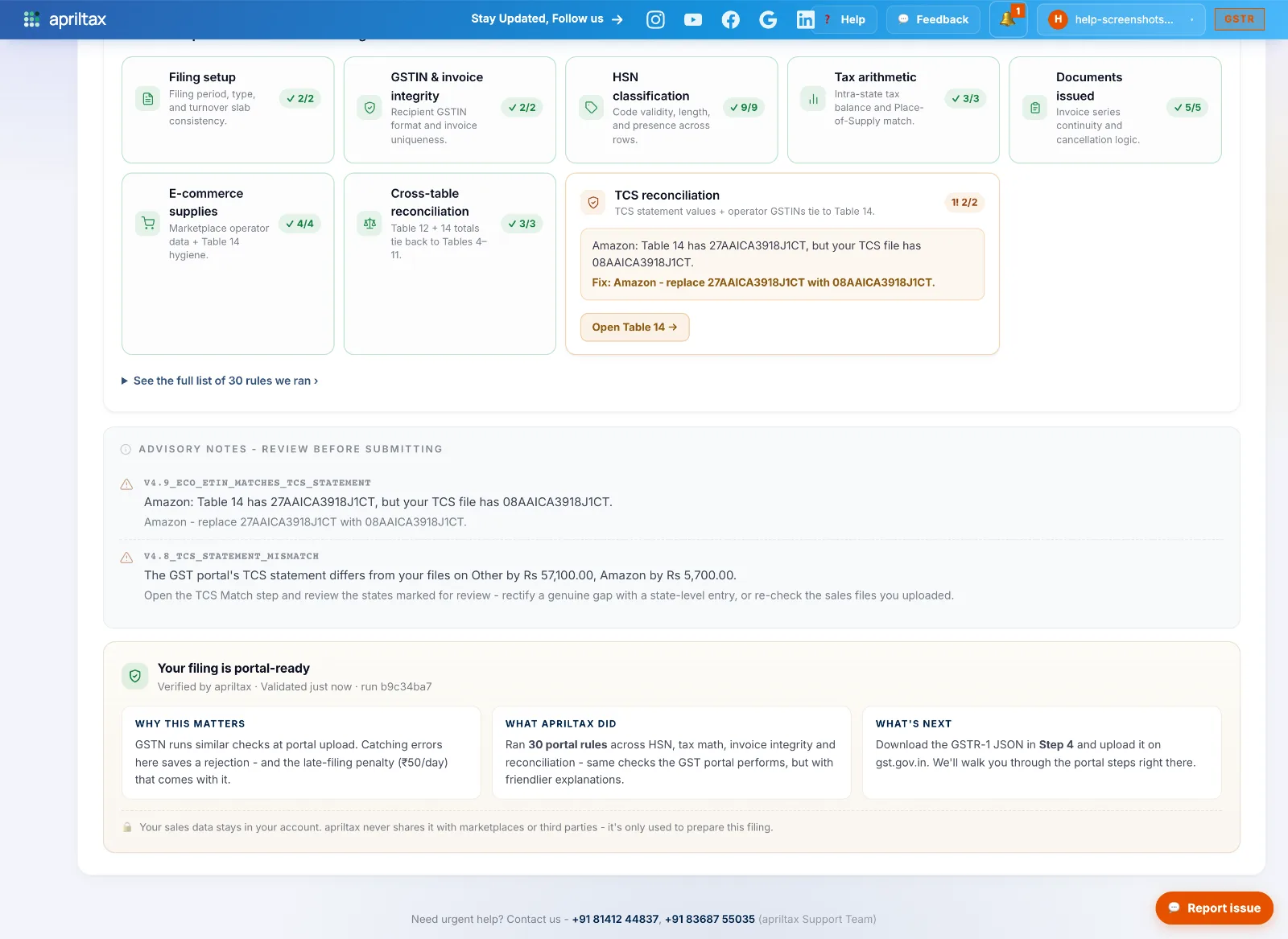
-
Open the E-Commerce Operators (Table 14) editor and add (or correct) the row with the GSTIN the finding names - the sales figures for that operator stay as computed.
-
Save and Re-run checks.
💡 Advisory only - but fixing it keeps your GSTR-1 consistent with the operator's GSTR-8, which is exactly what the department cross-checks.
A real apriltax team member, not a bot.